charts
Add a new persistent volume to a subchart
There are 3 steps to add a new persistent volume to a subchart:
-
Step 1: Declare new block in global.sharedPersistenceVolume variable in values.yaml of a stackchart (example values.yaml file of NMAA stack)
-
Step 2: Add helm template for the persistent volume in chart host-path-pv
-
Step 3: Add persistent volume claim to claim created persistent volume in subchart helm template
Step details
Step 1:
Declare new block described as below into global.sharedPersistenceVolume variable in values.yaml file of stack chart
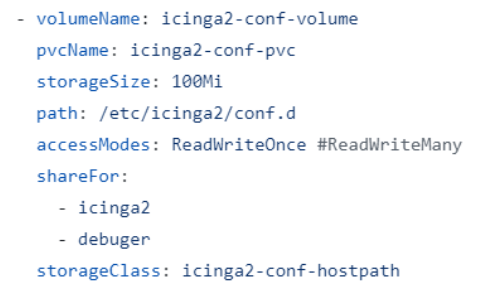
Meaning of each value above:
- volumeName: persistent volume’s name
- pvcName: persistent volume claim’s name, which will claim persistent volume
- shareFor: which subcharts will use this persistent volume
- storageClass: storage class name, persistent volume claim will claim persistent volume which has the same storage class name
After added this block into global.sharedPersistenceVolume variable, chart shared-volume will automatically for loop through global.sharedPersistenceVolume variable and create all declared persistent volume claim. So it is necessary to include shared-volume into stack chart
Step 2:
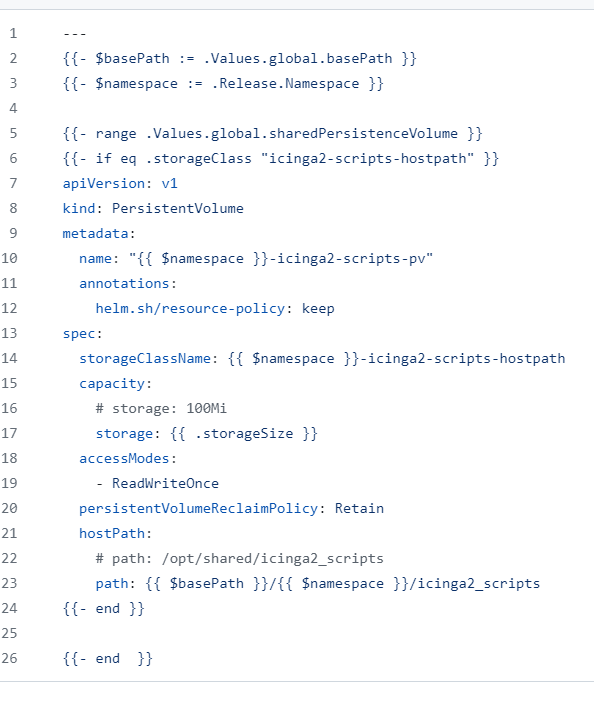
Add helm template for the persistent volume in chart host-path-pv with format described as below (example of icinga2-scripts-volume):
Step 3:
In the volumes block of a deployment or statefulset in a subchart, add code described as below:
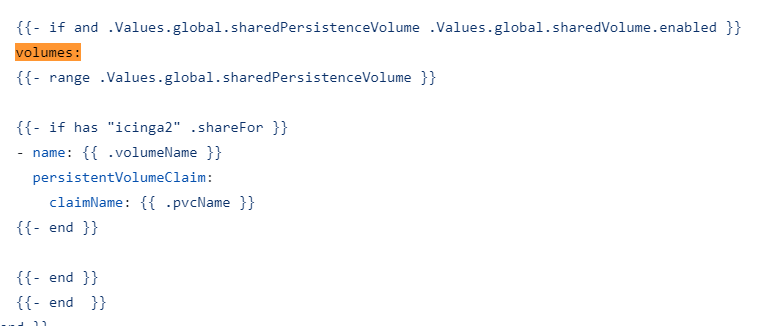
The if statement ensures only persistent volume used by that subchart be listed.